
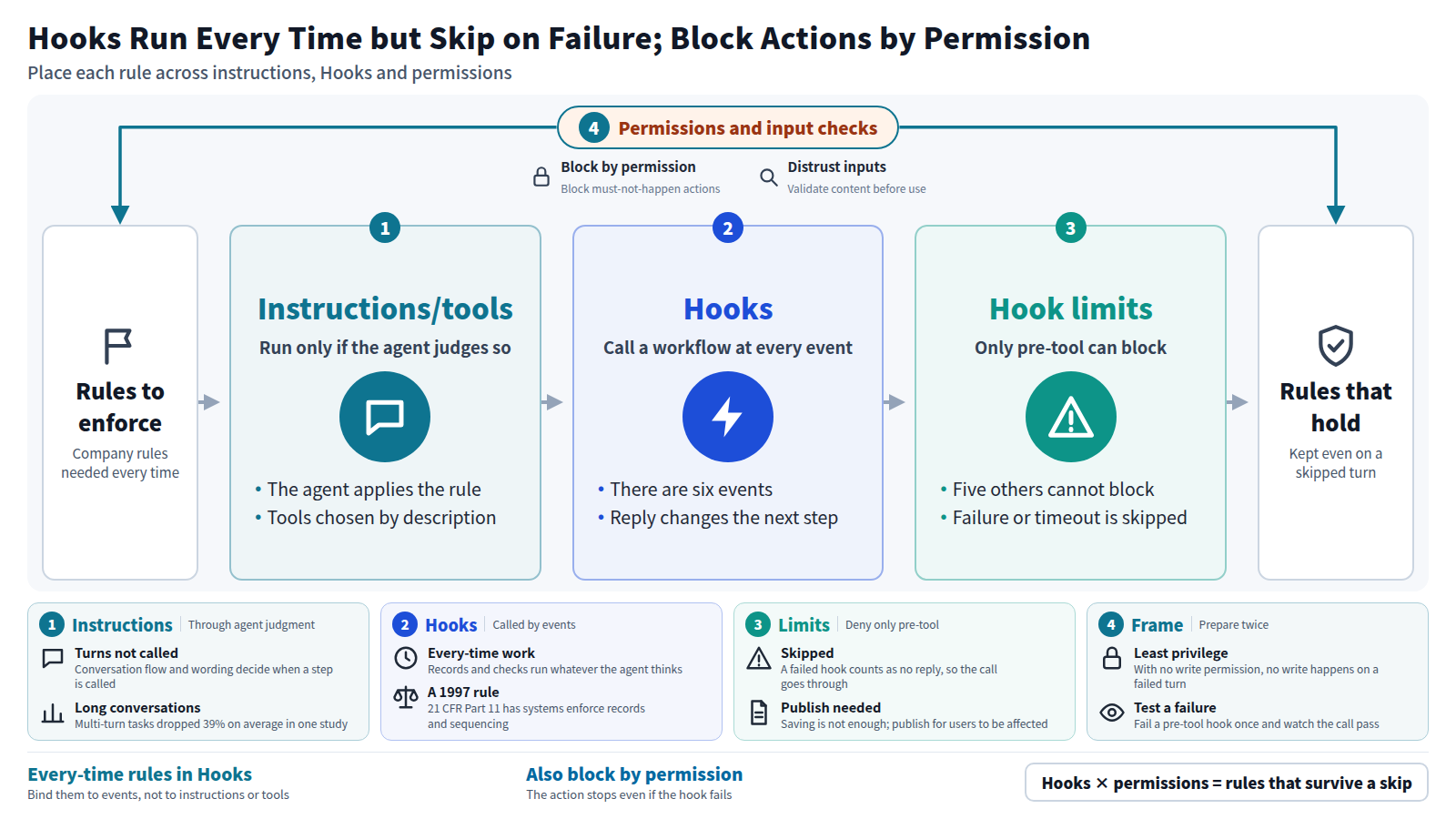
On 6 October 2026, Microsoft was reported to have added "Hooks" to the AI agents built in Copilot Studio. A hook calls a chosen workflow every time a set event occurs, such as the start of a conversation or a tool call, and the feature is available in preview. If you write a company rule into an AI agent's instructions, will the agent follow it every time? Not necessarily. Making a rule run every time takes an outside mechanism such as Hooks, and stopping an action even when a hook fails takes permissions on the system the agent connects to.
01Instructions depend on the agent's judgment; every-time rules need Hooks and permissions
Microsoft's documentation draws the line between tools and hooks in a single table. A tool runs only when the agent judges it relevant to the conversation. A hook runs every time its event occurs, whatever the agent thinks.
A rule written into the instructions is also read and applied by the agent itself. I read that as sitting on the tool side of the table: it works after passing through the agent's judgment, not before.
That splits the places where a company rule can live into three. There are the instructions, there are hooks, and there are the permissions on the systems the agent connects to. Rules that must apply every time, such as keeping a record or checking for an approval, should move out of the instructions and into hooks. Actions that must never happen, such as sending a particular email or deleting a record, should also be blocked by permissions. A hook that fails is skipped, so a hook alone is not enough.
02Hooks call a workflow at six kinds of events, and the reply changes the agent's next step
According to the documentation, every hook has two parts: an event and an action. The event is the point in the agent's run that the hook listens for. The action is what runs at that point, and for now it is always a workflow, a sequence of steps built with Microsoft's automation tools.
There are six events. A session starts. The user submits a message. A tool is about to run. A tool has finished. A tool has failed. An error has occurred outside a tool call. When one of these fires, Copilot Studio calls the bound workflow, passes it the details of what just happened, and reads the workflow's reply back into the conversation.
Every event hands the workflow the same three inputs: the event name, a timestamp, and a metadata object. The metadata carries the conversation ID, the user's ID and display name, the channel, and the agent's name. The documentation gives the example of writing an audit record that identifies both the user and the agent.
The boundaries matter too. The page opens by calling itself prerelease documentation that is subject to change. The feature applies to agents and workflows powered by what Microsoft calls the GitHub Copilot harness, the underlying layer that runs the agent. Building, testing and using such agents is billed by usage and may consume Copilot Credits.
03For drug-industry electronic records, a 1997 US rule already requires system-enforced logs and sequencing
The documentation lists four uses for hooks. Add context at the start of a session, such as the user's region or open cases. Check a tool call before it runs and block it if it breaks a business rule. Redact sensitive values from a tool's result, or write an audit record after it runs. Decide whether to retry, skip or stop when something fails.
Two of those uses, recording every operation and blocking steps taken out of order, have long been demanded of systems rather than of human attention in at least one regulated field: electronic records in the drug industry. The US rule 21 CFR Part 11 governs electronic records and electronic signatures, and it was published in 1997. Its section 11.10 sets out controls for anyone who keeps records in a closed system.
| What to look at | Copilot Studio Hooks (documented uses) | 21 CFR 11.10 (drug-industry e-records) |
|---|---|---|
| Recording operations | Write an audit record after a tool runs | (e) Secure, computer-generated, time-stamped audit trails |
| Order of steps | Check against a rule before a tool runs, and block if it fails | (f) Operational system checks to enforce permitted sequencing |
| Who did it | Identify the user and agent from metadata | (e) Record operator entries and actions |
The two columns describe the same jobs in the language of different decades. I have not established whether Part 11 applies to AI agents as such, and this essay does not claim it does. The narrower point is this: the idea that every-time recording and enforced sequencing should not depend on someone remembering has been written into drug-industry regulation since 1997.
The setting is not limited to medicine. Microsoft's own examples are a service desk that hands the agent a customer's open cases at the start of a chat, and an internal assistant that masks sensitive values in its answers. Both are ways to make something happen reliably that a careful employee would usually, but not always, remember to do.
04Whether a tool runs is decided by the agent, conversation by conversation, from its name and description
Part 11 refused to leave record-keeping to human attention. In an AI agent, whether a tool runs is decided by a component Microsoft calls the orchestrator. Copilot Studio's tools documentation says the orchestrator evaluates each user message and decides whether a tool is needed. Its evidence is the tool's name and description, which the documentation calls critical.
So if you place a record-keeping workflow as a tool, the orchestrator also decides whether the record gets kept. Depending on how the conversation goes and how the description is worded, there will be turns where it is called and turns where it is not. Bind the same workflow to a hook, and the decision to run it moves from the agent to the event.
Spreading a task over many turns has been measured to lower the quality of model output itself. In 2025, Laban and colleagues compared leading open and closed large language models on tasks given all at once versus spread over many turns. Every model they tested did significantly worse in multi-turn conversations, with an average drop of 39% across six generation tasks.
That 39% is not a rate of missed tool calls. It measures how much the quality of generated output fell on writing and coding tasks. Even so, it shows that model behavior becomes less stable as a conversation grows. A design that relies on the agent remembering the rule every time accepts that instability without the user having checked whether it reaches tool calls.
05Only the pre-tool event can block an action, and a failed hook is simply skipped
Hooks do not pass through the agent's judgment. Even so, Microsoft's documentation states two limits plainly.
The first is that only one event has the power to stop anything. A hook on the pre-tool event can return deny and block the call. The documentation states that this is the only event that can block an action. The other five can add context or change values, but cannot stop the agent.
Before a tool runs
Deny blocks the call, and the arguments can be replaced. This is the only event that can stop an action.
After a tool runs
The result can be masked or rewritten, and an audit record kept. The operation itself has already happened.
Failures and errors
The workflow can choose retry, skip or abort, and set the message the user sees.
Session start and user message
Background context can be added and the user's message rewritten, but the conversation cannot be stopped.
The second limit concerns what happens when the hook itself fails. If the workflow fails or times out, the agent carries on as though the hook returned nothing. The same applies when the workflow returns something the agent cannot read. A failed pre-tool hook therefore lets through exactly the call it was meant to stop.
The documentation warns readers not to rely on a hook as the only safeguard for a business-critical rule. Microsoft itself does not present hooks as the sole safeguard for a rule.
There is also a procedural point that is easy to miss. A workflow that has been saved but not published does not run. A hook added to an agent does not take effect for users until the agent is saved and published. Seeing a hook work in the test pane and seeing it work in live conversations are two separate checks.
06Put every-time rules outside the agent's judgment, put blocking rules in permissions, and check the inputs Hooks receive
Only the pre-tool event can block, and a failed hook is skipped. Taken together, those two facts mean each rule has to be placed deliberately rather than written down once and trusted.
Outside the judgment
Records and checks needed every time go into hooks, not into tools the agent chooses.
Doubled by permissions
Actions that must not happen are also blocked by narrowing permissions on the connected system.
Inputs checked
User text and tool results passed to hooks are treated as outside content and validated before use.
If a record-keeping duty lives in the instructions, there can be turns where the record is missing. Tools run only when the agent judges them relevant, and long conversations have been measured to cut task performance by 39% on average. That 39% is not a rate of missed calls, but it shows that the parts left to the model's judgment vary in quality. Anything whose absence would hurt belongs in a hook that the event calls. It also saves the effort of discovering a gap after the fact.
Rules that stop actions belong in both hooks and permissions. Microsoft's documentation says not to make a hook the only safeguard. OWASP, the non-profit security community, lists least-privilege access and human approval for high-risk actions among its mitigations for attacks on language models. If the agent's connection never received write permission, no write happens even on the turn when the hook fails.
The third concern is what flows into a hook. User prompts, tool results and error messages can contain text the agent did not produce. The documentation tells builders to treat those inputs as untrusted and validate them before acting. OWASP says it is unclear whether fool-proof methods exist to prevent prompt injection, the attack in which hidden text in an input hijacks a model's behavior. A checking workflow that takes its input at face value can have its own verdict steered.
07Hook failure rates are not yet public, so the activity record is the user's only evidence
Even with rules split across three places, nobody outside Microsoft can see how often hooks are actually skipped. Microsoft has not published failure rates. The documentation is a preview document and says the behavior may change.
The same design exists in another company's product. Anthropic's coding agent, Claude Code, has hooks that run at fixed points in its lifecycle. Its documentation says this gives deterministic control, because certain actions always happen rather than relying on the model to choose them. Like Copilot Studio's Hooks, it puts the every-time work outside the AI's judgment. Whether the pattern will spread further cannot be read from the sources at hand.
What a user can check is the record. Copilot Studio has an activity trace for following what an agent did, and the documentation points builders to it for debugging. Before publishing, run a test conversation and see whether the hook's call and its verdict appear in that trace.
If I were deploying one, I would make a pre-tool hook fail on purpose once. Watching the call it was meant to stop go straight through gives a concrete reason, one a manager or auditor can follow, for also blocking the action with permissions. Until failure rates are published, that test record is how a deployer can see what gets through when a hook fails.
- In Copilot Studio, tools run only when the agent judges them relevant, while hooks run at every event. Rules needed every time belong in hooks, not in instructions.
- Only the pre-tool hook can block an action, and a failed workflow is skipped. Actions that must not happen should also be blocked by permissions on the connected system.
- Microsoft's documentation says inputs to hooks are untrusted content. Their contents must be checked before a workflow decides anything from them.
A rule written into instructions is applied through the agent's own judgment. Rules that must hold every time go into hooks, and actions that must not happen are also blocked by permissions. Then the rule survives even on the turn when a hook is skipped.
Unlike instructions and tools, hooks call a rule every time without passing through the agent's judgment. Yet Microsoft's own documentation tells builders not to rely on them alone. Each time a rule is written down, the person deploying the agent has to ask two questions: is it needed every time, and must it stop something? Taking that trouble is the responsibility that comes with handing work to an agent.
- Microsoft Learn. Hooks (preview) - Microsoft Copilot Studio. 2026-09-29.(Six events, only pre-tool can block, skipped on failure, untrusted inputs, preview and billing)
- Cloud Wars (Tom Smith). Need AI Agents To Run Workflows With No Exceptions? Microsoft Has A Hook for That. 2026-10-06.(Report on Hooks)
- Microsoft Learn. Tools overview for agents - Microsoft Copilot Studio. 2026-06-23.(The orchestrator chooses tools by name and description)
- Anthropic (Claude Code Docs). Automate actions with hooks. Accessed 2026-10-07.(Hooks that always run rather than relying on the model)
- Philippe Laban, Hiroaki Hayashi, Yingbo Zhou, Jennifer Neville. LLMs Get Lost In Multi-Turn Conversation. arXiv:2505.06120, 2025.(Average 39% drop in multi-turn conversations)
- OWASP GenAI Security Project. LLM01:2025 Prompt Injection. 2025.(Least privilege, human approval for high-risk actions, no known fool-proof prevention)
- U.S. Code of Federal Regulations. 21 CFR § 11.10 - Controls for closed systems. Via Cornell LII.((e) time-stamped audit trails, (f) enforced sequencing)