
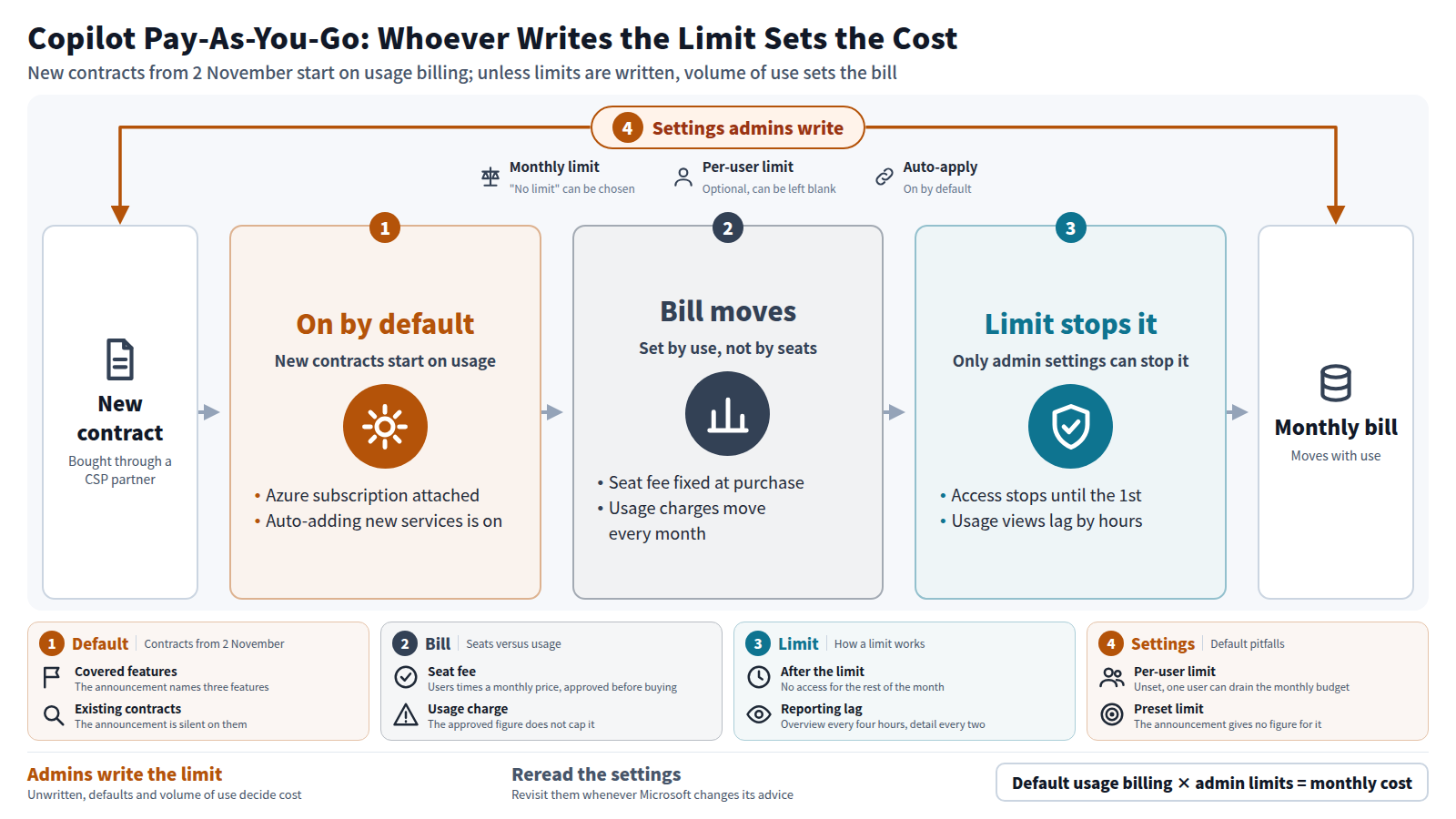
On 16 September 2026, Microsoft told its resellers that usage-based billing for AI agents and related services will be switched on by default in new Microsoft 365 Copilot Business contracts. The change applies to contracts bought from 2 November through the Cloud Solution Provider (CSP) channel, the programme through which partners resell Microsoft licences. When AI agents are billed by use rather than by seat, who decides what an organisation pays each month? The spending limits and scope that administrators write decide how far it can rise and which features it covers. If administrators write nothing, the volume of use decides it, under Microsoft's default settings.
01Without a Written Limit, Copilot Spending Is Set by Volume of Use
From 2 November, one thing changes in the way Copilot Business is bought. In new contracts purchased through a CSP partner, pay-as-you-go billing for AI agents and similar services will be on from the start. Pay-as-you-go means the bill depends on the amount used, not on the number of people licensed.
Microsoft's administrator documentation shows that the monthly spending limit can be set to "no limit." A setting that automatically adds new services to the spending policy is on by default. If an administrator neither writes a limit nor turns off the automatic additions, the bill will be set by how much people use.
My answer lies in the last arrow of Figure 1. The only things that can stop the cost are the limits and scope an administrator writes. An organisation adopting Copilot therefore has something to settle before it counts seats: who writes the limits and the scope, and who reads the monthly consumption.
02The Change Covers Only New Contracts Bought Through CSP Partners from 2 November
To claim that administrator settings decide the cost, we first need to know exactly where the default changes. Microsoft's partner announcement sets out the scope.
According to the announcement, the change applies to Copilot Business newly purchased through CSP, whether bought on its own or as part of a bundle. In those new contracts, usage-based billing is on by default. Pay-as-you-go charges require an Azure subscription, and that subscription now comes attached from the start as well.
The unit of consumption is called Copilot Credits. When a user works with an eligible feature, Copilot Credits are consumed. The announcement named three features as covered by the new default.
Copilot Cowork
A feature that carries out work on the user's behalf inside Copilot, consuming Copilot Credits as it is used.
Work IQ API
A way for an organisation's own apps and agents to call on Copilot's work context, charged per call.
GitHub Copilot Harness
The third feature Microsoft's announcement listed as falling under usage-based billing.
The announcement does not say whether the new default reaches contracts already in place. It says neither that it does nor that it does not. Organisations with existing contracts need to look at the values in their own admin centre.
03Seat Fees Are Fixed at Purchase; Usage Charges Move Every Month
The default changes for organisations buying Copilot Business new through a CSP partner. Within those organisations, which part of the cost changes character?
Copilot Business has mainly been paid for by the seat. A seat fee is the number of users multiplied by a monthly price. Before buying, the organisation checks that amount in an internal approval and signs off on it. Once approved, the amount stays the same each month unless headcount changes.
A usage charge works differently. The bill is set by the Copilot Credits consumed that month. In a month when people lean heavily on agents, the bill rises; in a quiet month it falls. The figure approved at the time of purchase does not cover usage charges.
The reseller's position is worth recording too. In the same announcement, Microsoft wrote that partners will be rewarded for growing the use of Copilot Cowork. I cannot say how partners will respond to that. What can be stated as fact is that more usage brings Microsoft more usage revenue, and more use of Copilot Cowork brings the partner a reward.
04Microsoft Says the Default Removes Setup Work
A seat fee is fixed at purchase, while a usage charge moves month to month. So for what reason did Microsoft decide to switch pay-as-you-go on by default? Microsoft's own explanation is the place to start.
In the partner announcement, Microsoft gave two benefits of the default. One is that it removes a billing setup that used to take several steps. The other is that earlier use by customers leads to growth in consumption.
The two rows of Figure 2 differ in when the cost is decided. The seat fee in the upper row is set once, at purchase. The usage charge in the lower row is set by each month's activity, and the only thing that can stop it is a limit setting.
Charles Lamanna, who leads Copilot at Microsoft, has described where this shift may lead. GeekWire quoted him: "If my agent interacts with your app exclusively, the agent's your customer, not the end user... And agents are very harsh customers."
Lamanna's remarks describe a view in which software pricing moves from counting human seats to counting use. I will not speculate further about Microsoft's aims. What the announcement and the remarks support is this much: Microsoft wants to extend paying by volume of use.
05Hitting the Limit Stops Access Until the 1st; Usage Reports Refresh Only Every Two to Four Hours
Microsoft says the default saves setup work. Once that work is skipped, which settings remain, and what do they actually do? Microsoft's documentation allows us to count.
An administrator chooses between "no limit" and "limit" for the monthly cap. A per-user limit can also be written, but it is optional. When a user reaches the limit, that user loses access to agents and services for the rest of the month. Access returns on the first of the next month, when Copilot Credits reset.
The screens that show consumption also lag. The overview page refreshes every four hours and the consumption page every two hours. The figures an administrator sees can be up to a few hours old.
| Setting | Default or initial state | What happens when you set it |
|---|---|---|
| Monthly limit | "No limit" can be chosen | Use stops at the limit and resets on the 1st |
| Per-user limit | Optional (can be left blank) | Stops one person from using up the budget |
| Auto-apply new services | On | Turned off, new features join only when an admin selects them |
| Consumption view | Refreshed every two hours | Shows who used what, by user and feature |
There is one clue to price. In October 2025, Microsoft announced a pay-as-you-go rate of $0.01 per message for Copilot Studio. I could not confirm, however, that a Copilot Studio message and a Copilot Business credit carry the same price. That figure cannot be used to calculate a Copilot Business bill.
06Limits Are Optional, New Agents Join Automatically, and the Preset Amount Is Unpublished
Access stops at the limit, and the consumption view can run up to hours behind. Leave these settings at their defaults, and what can happen to an organisation's costs? Three points stand out from the documentation and the announcement.
First, per-user limits are optional. Microsoft itself recommends setting them to stop one person from exhausting the budget. If administrators set only a monthly limit and leave per-user limits blank, one user's habits can drain the whole organisation's monthly budget. Once the budget is gone, other users also lose access to agents until the month ends.
Second, new services are added automatically. The setting that places new agents and services under the spending policy is on by default. Unless an administrator turns it off, features nobody in the organisation chose can begin to incur charges. Microsoft says it will keep adding agents and services to the spending system.
Third, the preset limit is not published as a figure. The partner announcement mentions "the preset monthly limit" but gives no amount. Technspire, a consultancy blog, also pointed out that the announcement page carries no figure. Some commentary articles do state an amount, but I could not confirm one in Microsoft's own material.
Every step in Figure 3 is an administrator's job. The limit should be checked against the value in the organisation's own tenant, not against a figure on a partner's slide. A tenant is the administrative unit an organisation holds in order to use Microsoft 365. Because the consumption page refreshes every two hours, the organisation should also decide who reads it and how often.
07Microsoft Says Its Recommended Guardrails May Change, So Spending Limits Will Need Revisiting
Setting spending limits is left to the administrators of the adopting organisation. The settings and prices those limits depend on belong to Microsoft, though. Could those change?
In its documentation, Microsoft says it will revise its recommended limits and policies as it observes usage patterns. It also says it will continue to add agents and services to the spending system. When Microsoft revises its recommendations or coverage, the settings an administrator wrote in November no longer mean what they meant when written. When a new agent is added, the share of the limit available to each use shifts as well.
The preset limit
The partner announcement refers to "the preset monthly limit" but gives no figure for it.
Existing contracts
Microsoft's announcement covers new purchases and does not say whether the default reaches contracts already in place.
Changing recommendations
Microsoft writes that its recommended limits and policies may change over time.
If Lamanna's view proves right, the change in pricing will spread beyond Copilot. Other companies' apps that agents use may also come to be priced by volume of use. But Microsoft's material contains no figures forecasting that. From the documents I read, it is not possible to say which products will change, or when.
One thing can be said with confidence. Under usage billing, a spending limit is not set once and then left. Each time Microsoft changes a recommendation or adds a new agent, administrators will need to reread their own settings.
- Microsoft makes per-user limits optional while recommending them to stop one person exhausting the budget; leave them unset and a single user's habits can exhaust the monthly budget.
- Automatically adding new services to spending policies is on by default; unless it is switched off, agents nobody chose can start to cost money.
- The partner announcement gives no figure for the preset limit, so the spending limit must be checked against the value in your own tenant, not a partner's slide.
When AI agents are billed by use, the limits and scope that administrators write decide how far each month's cost can go and what it covers. Write nothing, and the volume of use decides it under Microsoft's defaults.
What was announced for 2 November is a change to the default for usage billing, not to any price. It alters where responsibility for setting spending limits sits. With seat fees, one approval at purchase was enough. With usage billing, an organisation has to name the person who writes the limits and the person who reads consumption, and it has to reread its settings each time Microsoft changes them.
- Microsoft Learn (Partner Center announcements). Usage-based billing is default on for new Microsoft 365 Copilot Business licenses starting November 2, 2026. 2026-09-16.(Date and scope of the default, the three named features, partner benefits and rewards, mention of the preset monthly limit)
- Microsoft Learn. Usage-Based Billing and Cost Management for Copilot Credits.(Definition of Copilot Credits, auto-apply new services enabled by default, more services to be added)
- Microsoft Learn. Managing AI experiences enabled by usage-based billing.(Monthly limit options, per-user limits, loss of access at the limit until the 1st, refresh intervals, changing recommendations)
- GeekWire. 'Agents are very harsh customers': Microsoft exec warns many apps will lose pricing leverage. 2026-09-30.(Charles Lamanna's remarks and the view that pricing shifts toward usage)
- Microsoft Copilot Blog. Scale your agent rollout with confidence: Introducing Copilot Credit Pre-Purchase Plan. 2025-10-27.(Copilot Studio pay-as-you-go at $0.01 per message)
- Technspire. Copilot Credits go default-on: your 2 November checklist. 2026-09-30.(The partner announcement page does not publish the preset limit figure)
- Topedia Blog. New Microsoft 365 Copilot Business subscriptions from CSP Partners will come with PAYG preconfigured. 2026-09-30.(Reporting of the default and the named features: Copilot Cowork, Work IQ APIs, GitHub Copilot Harness)